- Client project
- In production use since October 2026
- Not a commercial product
Messy CSV uploads in. Clean, accounted-for data out.
DropFilter is a data pipeline we designed and built for a client’s operations team. Every CSV upload goes through seven checks in a fixed order, and only rows that are new and valid reach their production PostgreSQL database, with a permanent record of where every row went.
The client is not named, and their data never appears on this page.
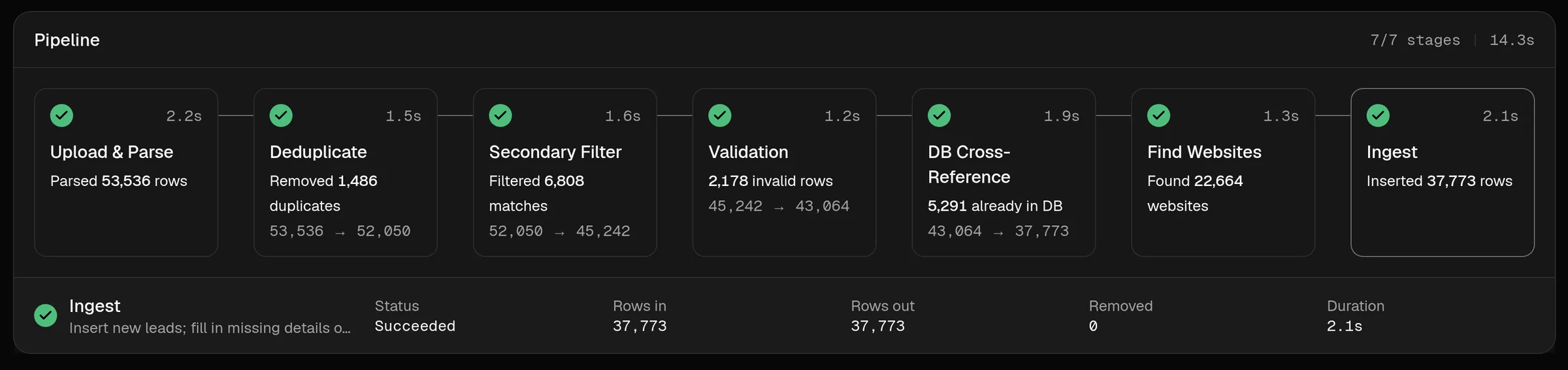
Daily files, one production database.
The client’s team receives contact lists every day as CSV files, from sign-up forms, events and partners. All of it has to end up in one production database that other work depends on.
Done by hand in spreadsheets, that means repeated rows, contacts who asked not to be contacted slipping back in, records that already exist being added again, and no reliable answer to a simple question: what happened to this row?
They needed a gatekeeper: nothing reaches production without passing the same checks in the same order, and every run explains itself.
Each stage takes what the last one left.
If any stage fails, the run stops, later stages are skipped and nothing is inserted. A run can be cancelled at any point before the final insert begins.
Seven checks, always in the same order. The real interface, running a simulated file.
- CheckedStage 1:
Upload & parse
Header checked against the template
Checked - CheckedStage 2:
Deduplicate
Duplicate rows removed
Checked - CheckedStage 3:
Suppression filter
Suppressed contacts removed
Checked - HeldStage 4:
Validate
Invalid rows rejected, with the reason
Held - CheckedStage 5:
Cross-reference
Rows already in production removed
Checked - CheckedStage 6:
Enrich
Can never fail or hold up a run
Checked - CheckedStage 7:
Ingest
Every row lands, or none do
Checked
Stage 1
CheckedUpload & parse
A CSV is uploaded through the dashboard and streamed to storage. The file is read in fixed-size chunks and its header is checked against the expected template. A malformed file fails the stage instead of silently losing rows.
Removes: Nothing
Stage 2
CheckedDeduplicate
Each row is normalized and hashed, and exact repeats within the file are removed, across chunks as well as within them.
Removes: Duplicate rows
Stage 3
CheckedSuppression filter
Rows whose email address is on the suppression list (people who unsubscribed, bounced or were blocked) are removed before anything else happens to them.
Removes: Suppressed contacts
Stage 4
CheckedValidate
Rows missing required fields are rejected, and email syntax is checked. Optionally, mailboxes are verified with a third-party service within a daily quota; anything not checked yet is flagged as unverified rather than silently trusted.
Removes: Invalid rows
Stage 5
CheckedCross-reference
The remaining rows are compared with the production database in one set-based query, and rows that already exist there are removed.
Removes: Rows already in production
Stage 6
CheckedEnrich
Each contact’s company website is worked out from its email domain with a bounded DNS lookup, and a missing country is filled in from the domain ending. This stage can never fail or hold up a run.
Removes: Nothing
Stage 7
CheckedIngest
Accepted rows are inserted into PostgreSQL in a single transaction: either every row lands, or none do. Conflicting rows are skipped safely, even if another process writes at the same time.
Removes: Nothing
Then
Report
Row accounting, rejected rows with reasons, and a permanent audit record. Details below.
Row accounting
Every run reports initial rows, what each stage removed, and what was inserted. The numbers always add up, and the test suite checks that they do.
Rejected rows, with reasons
Rows removed by each stage are stored with the reason they were removed and can be exported through the API. A download button in the dashboard is not built yet.
Permanent audit trail
Every upload is recorded: who ran it, when, the result of every stage, and where each row went. Records are not edited or deleted after a run finishes.
A thin API, background workers, and storage between stages.
The API never does heavy data work. It accepts the upload and queues the run; workers do the processing, and the dashboard simply follows the events they publish.
Browser
Dashboard
Next.js · React
Upload, live progress, audit log
Application
API
FastAPI
Auth, upload streaming, job creation, live event relay
Workers
Celery · pandas
Run the seven stages as a chain of tasks
Data
Object storage
S3-compatible
Raw uploads, per-stage Parquet, rejected rows
Redis
Queue · event streams
Task queue, per-run event stream, DNS cache
App database
PostgreSQL
Jobs, stage results, audit log
Production database
PostgreSQL
Checked in stage 5, written in stage 7
How data and events move
- 1.Dashboard → API: CSV upload, streamed straight to object storage
- 2.API → Redis → Workers: the run is queued as a chain of seven tasks
- 3.Workers ↔ Object storage: each stage reads the previous output and writes its own
- 4.Workers → Redis → API → Dashboard: progress events, followed live over server-sent events
- 5.Workers → Production database: one set-based lookup (stage 5), one transactional insert (stage 7)
Built to be trusted with production data.
- Never hold a whole file in memory
Uploads stream to object storage; workers read them back in fixed-size chunks.
WhyMemory use stays flat whatever the file size, and the API stays responsive while files process.
- One task per stage, with saved output
Each run is a chain of seven background tasks; every stage writes its output to storage as Parquet.
WhyA stage can be retried on its own, a worker restart doesn’t lose work, and rejected rows can be exported per stage.
- All-or-nothing ingest
The final insert is a single database transaction that skips conflicting rows instead of failing.
WhyProduction data is never left half-updated, and concurrent writers can’t create duplicates.
- Set-based database work
Stages that touch the database bulk-load keys into a temporary table and run one join.
WhyOne round trip instead of one query per row, so large files don’t hammer the production database.
- Enrichment can’t break a run
Website lookups are concurrency-limited, time-boxed, cached and never raise errors.
WhyThe worst case is fewer websites found, never a failed or stuck upload.
- Live progress that survives reconnects
Workers publish events to Redis Streams; the dashboard follows them over server-sent events.
WhyProgress is one-way data, and a browser that reconnects replays the events it missed.
- Numbers that must add up
Row counts are reconciled between stages, and the tests assert it.
WhyA run whose numbers don’t reconcile is treated as a bug, not a rounding error.
- Safe by default
Upload size limits, duplicate-submission protection, per-user rate limits, and escaping of spreadsheet formulas in rejected-row and lead exports.
WhyAn internal tool still handles untrusted files and personal data.
Technology
- Dashboard
- Next.jsReactTypeScriptTailwind CSS
- API
- PythonFastAPIServer-sent events
- Pipeline
- CelerypandasParquetxxHash
- Data
- PostgreSQLRedisS3-compatible storage
- Operations
- Docker ComposeVersioned migrationsGitHub Actions CIScripted backups & rollback
Watch every stage as it runs.
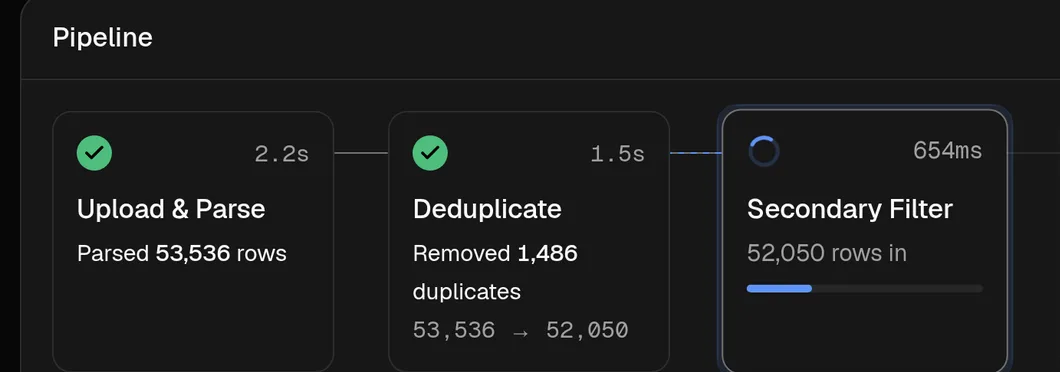
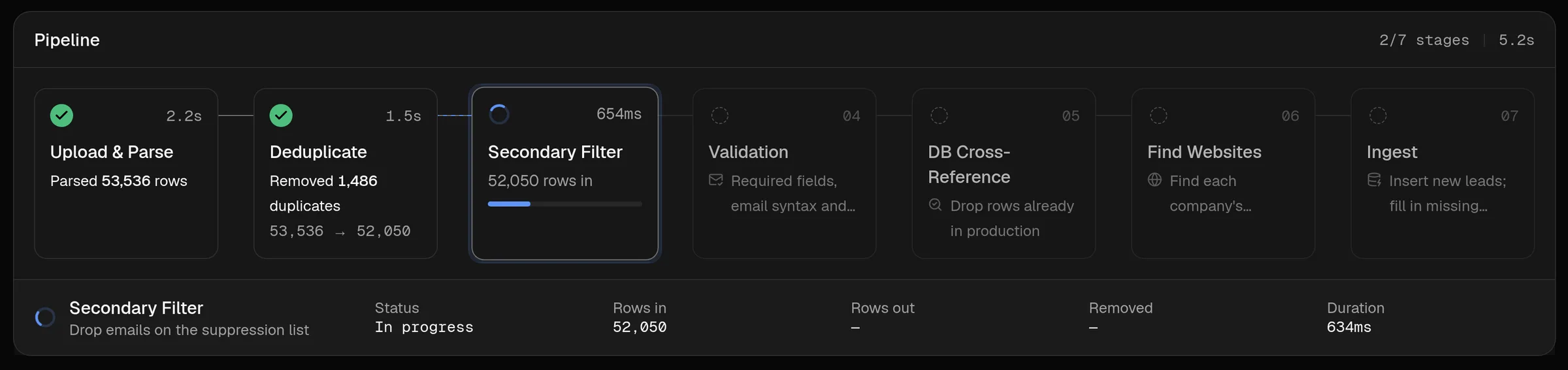
While a file processes, each stage card moves from queued to running to finished and shows what it removed. These screenshots come from DropFilter’s demo mode, which drives the real interface with a simulator, so no client data is shown.

In production, still developing.
The client’s team has used DropFilter with real data since October 2026, and it continues to receive regular releases.
DropFilter is not a commercial product and isn’t for sale. It was built around one client’s workflow; we show it because it is a good example of how we build data pipelines.
In use today
- Seven-stage pipeline, dashboard with live progress, audit log
- Sign-in and user management
- Lead management, campaign downloads and activity tracking
- Versioned releases, rehearsed against a restored backup before each update
Not built yet
- A dashboard button for downloading rejected rows (available through the API today)
Contacts today. Orders and manifests tomorrow.
DropFilter processes contact data, but the parts that make it reliable aren’t specific to contacts: staged checks in a fixed order, removed rows kept with a reason, numbers that reconcile, an all-or-nothing load and a permanent audit trail. Those are exactly what order files, stock feeds and shipment manifests need.
Need a pipeline your team can trust?
Tell us where your files come from and what has to happen to them before they reach your systems. An engineer will reply with an honest view of what’s worth building.
- Reply from an engineer
- Written scope before any build
- You own what we build